系统概述
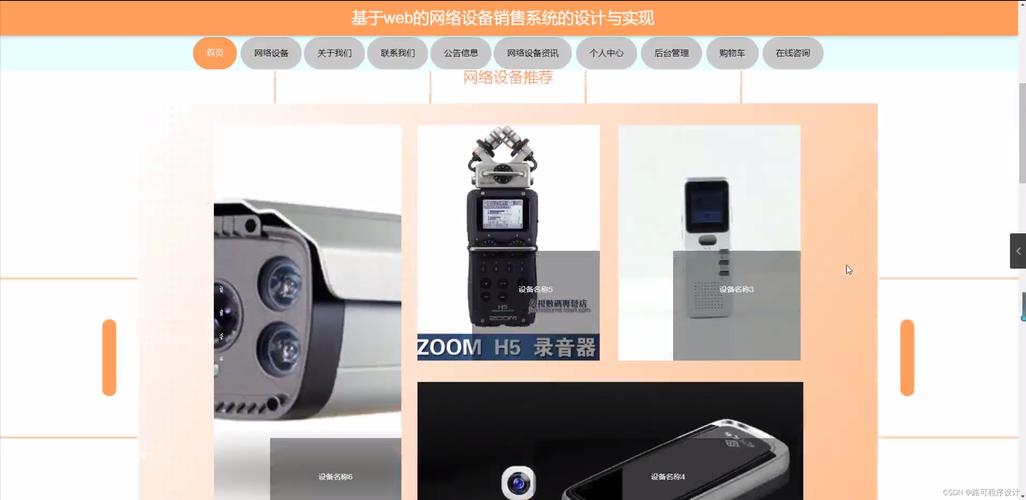
本系统采用Java EE技术栈,基于B/S架构设计,实现了一个面向互联网设备(路由器、交换机、防火墙等)的在线销售平台。系统包含前台商城与后台管理两大模块,支持商品浏览、购物车、订单管理、用户管理、库存管理等功能。技术选型:Spring Boot + Spring MVC + MyBatis + MySQL + Thymeleaf + Bootstrap。
系统功能模块
- 前台商城:用户注册登录、商品分类浏览、搜索、商品详情、购物车、下单支付(模拟)、订单查询、个人中心。
- 后台管理:管理员登录、商品管理(增删改查)、分类管理、订单管理(发货、取消)、用户管理、库存监控、销售统计。
数据库设计
采用MySQL数据库,主要表包括:
user(用户表):id, username, password, email, phone, address, role, create_timecategory(分类表):id, name, parent_idproduct(商品表):id, name, categoryid, price, stock, description, imageurl, status, create_timecart(购物车表):id, userid, productid, quantity, create_timeorder(订单表):id, orderno, userid, totalamount, status, address, createtimeorder<em>item(订单项表):id, orderid, product_id, quantity, price
核心代码实现
1. 实体类示例(Product.java)
public class Product {
private Integer id;
private String name;
private Integer categoryId;
private BigDecimal price;
private Integer stock;
private String description;
private String imageUrl;
private Integer status; // 1上架 0下架
// getter/setter省略
}
2. Mapper接口(ProductMapper.java)
@Mapper
public interface ProductMapper {
@Select("SELECT * FROM product WHERE status = 1")
List<Product> selectAllOnSale();
@Select("SELECT * FROM product WHERE id = #{id}")
Product selectById(Integer id);
@Update("UPDATE product SET stock = stock - #{quantity} WHERE id = #{id} AND stock >= #{quantity}")
int reduceStock(@Param("id") Integer id, @Param("quantity") Integer quantity);
}
3. Service层(OrderService.java)
@Service
@Transactional
public class OrderService {
@Autowired
private OrderMapper orderMapper;
@Autowired
private ProductMapper productMapper;
public String createOrder(Integer userId, List<CartItem> items, String address) {
// 生成订单号
String orderNo = "ORD" + System.currentTimeMillis();
BigDecimal total = items.stream()
.map(i -> i.getPrice().multiply(new BigDecimal(i.getQuantity())))
.reduce(BigDecimal.ZERO, BigDecimal::add);
Order order = new Order();
order.setOrderNo(orderNo);
order.setUserId(userId);
order.setTotalAmount(total);
order.setStatus(0); // 待支付
order.setAddress(address);
orderMapper.insert(order);
// 插入订单项并扣减库存
for (CartItem item : items) {
OrderItem oi = new OrderItem();
oi.setOrderId(order.getId());
oi.setProductId(item.getProductId());
oi.setQuantity(item.getQuantity());
oi.setPrice(item.getPrice());
orderMapper.insertItem(oi);
int rows = productMapper.reduceStock(item.getProductId(), item.getQuantity());
if (rows == 0) throw new RuntimeException("库存不足");
}
return orderNo;
}
}
4. Controller示例(ProductController.java)
@Controller
@RequestMapping("/product")
public class ProductController {
@Autowired
private ProductService productService;
@GetMapping("/list")
public String list(Model model, @RequestParam(required=false) String keyword) {
List<Product> products = productService.search(keyword);
model.addAttribute("products", products);
return "product/list";
}
@GetMapping("/detail/{id}")
public String detail(@PathVariable Integer id, Model model) {
Product product = productService.getById(id);
model.addAttribute("product", product);
return "product/detail";
}
}
系统配置
- application.properties:`
spring.datasource.url=jdbc:mysql://localhost:3306/device_sales?useSSL=false&serverTimezone=UTC
spring.datasource.username=root
spring.datasource.password=123456
mybatis.mapper-locations=classpath:mapper/*.xml`
部署与运行
- 执行MySQL脚本创建数据库及表结构,插入初始化数据。
- 修改application.properties中的数据库连接信息。
- 使用Maven构建:
mvn clean package。 - 运行jar包或部署到Tomcat。
- 访问前台
http://localhost:8080,后台http://localhost:8080/admin。
源码与文档
完整源码包含实体类、Mapper、Service、Controller、前端页面(HTML+Thymeleaf)、SQL脚本及设计文档(需求分析、ER图、用例图、测试报告)。可按需扩展支付接口集成、物流跟踪等功能。